Retail Audit Checklist: How to Score Different Outlet Formats Fairly
By Naseef Umar, Founder and CEO of AutoSmart, an automotive industry expert with over a decade of experience in dealer standards, network performance and audits.
A retail audit checklist is a standard set of observable pass or fail checks that scores each outlet against the standards it can actually meet, using weighted points earned divided by weighted points applicable. Most checklists skip that last step. They assume every outlet offers everything, so a 3-bay workshop looks weak and a flagship showroom looks strong for reasons that have nothing to do with standards. This guide covers format profiles, N/A arithmetic with a worked example, weighting, a first-time coverage list and what checklist software fixes. If your spreadsheet audits are starting to strain, start here.
Key Takeaways
A retail audit checklist scores fairly when each outlet's score is weighted points earned divided by weighted points applicable, with N/A items removed from both.
Format profiles, approved by head office, decide which items apply. Auditors should not pick N/A on the day.
Critical items apply only where the service exists, and a missing module must never hide a critical failure in a service the site does offer.
Regional scores should pool points across sites rather than average site percentages.
Checklist software fixes version drift with one controlled master template, a locked formula and an audit trail.
How do you keep retail store audit scoring fair when outlets offer different services?
Retail store audit scoring stays fair across formats when each outlet gets a format profile and a score of weighted points earned divided by weighted points applicable, with N/A items removed from both. That matters because US retailers lose 6.4% of gross sales to in-store operational failures (eMarketer, 2026), and unfair scoring sends effort to the wrong sites.
Use format profiles, not auditor discretion
A format profile is a tag on each outlet, based on services offered, bay count or showroom size, that switches checklist modules and items on or off. Head office approves the profile once. The auditor then opens a checklist that already contains only the relevant items.
Format profile
Modules switched on
Modules switched off
3-bay workshop
Workshop, customer handling
Showroom
Flagship site
Showroom, workshop, customer handling
None
Sales-only outlet
Showroom, customer handling
Workshop
Do the N/A arithmetic
A not-applicable (N/A) item is an audit item removed from a site's score because the site does not offer the activity it measures. The fair method is one ratio: score = weighted points earned / weighted points applicable. The point values below are hypothetical, invented to show the arithmetic. They are not measured data. Assume the workshop section is worth 40 points, the showroom 30 and customer handling 30.
Section
3-bay workshop (earned / possible)
Flagship (earned / possible)
Workshop
32 / 40
36 / 40
Showroom
N/A
24 / 30
Customer handling
24 / 30
25 / 30
Total
56 / 70
85 / 100
With N/A removed, the workshop is judged on 56 of its 70 applicable points and the flagship on 85 of 100. Now compare the other treatments for the same hypothetical workshop:
N/A treatment
3-bay workshop result (points)
Counted as a fail
56 of 100
Counted as a pass
86 of 100
Removed from the score
56 of 70
Counting N/A as a fail buries the small site under a denominator it can never fill. Counting it as a pass hands it free points for doing less. Removal is the only treatment that compares like with like.
Put guardrails around N/A
Removal creates an incentive to mark hard items N/A. Four controls close the gap:
Tie N/A rules to a site-attribute register, so the profile decides, not the auditor.
Require a reason code and a photo for any exception.
Report the share of items marked N/A per site, and flag sites above a threshold the programme owner sets.
Block N/A on critical items unless the underlying attribute is absent.
Keep critical items honest
A critical item is a checklist item whose failure triggers a hard fail or escalation regardless of the percentage score. A workshop-only safety item should trigger only at sites with a workshop. Equally, a missing showroom module must not mask a critical failure in the workshop the site does run. For the workshop side of this, see how 5S audits run consistently across dealer sites.
Roll up regions with pooled points
A pooled score is a regional score calculated by adding points earned and points possible across sites, then dividing. Averaging site percentages is only correct when every site has identical points possible, and N/A handling breaks that. In the hypothetical example, the two sites pool to 141 of 170 points.
How should you weight sections so a small outlet and a flagship compare fairly?
Weighting sections for a mixed-format retail network means giving each section points in proportion to its business impact, agreed with function owners and fixed across every site. T-ROC reports average planogram compliance of 50-70% (T-ROC, 2026), which is why display earns real weight. When a section drops out, the remaining weights are re-normalised.
A weighted score is a total in which each item or section counts for a set number of points rather than equally. Set weights from evidence, not gut feel. Link them to availability, price accuracy or safety exposure, and review them on a schedule. Flat severity bands (critical 10, aesthetic 2) are a start, but they say nothing about what happens when a section disappears. Re-normalising does: in the hypothetical workshop above, its 70 applicable points become the whole denominator.
Three habits keep comparisons honest:
Show section scores beside the total. Picture two hypothetical sites with the same overall score. One is weak in its workshop section, the other in its showroom. They need different conversations.
Set critical thresholds separately. One failed safety item should flag a site even when the percentage is high.
Benchmark against peers first. Compare a site with same-format peers, then its own trend, then the network average. Rank across formats last.
Rules written this way also make disputes rarer. When a dealer challenges a score, the answer is a formula, not an opinion.
What should an internal audit checklist for retail cover first?
A first internal audit checklist for a retail network should cover merchandising and display, price accuracy, availability, safety, cleanliness and customer experience, with each item written as an observable pass or fail. Coresight Research's 2026 survey found US retailers lose 6.4% of gross sales to in-store operational failures (eMarketer, 2026), which is the cost these checks exist to catch.
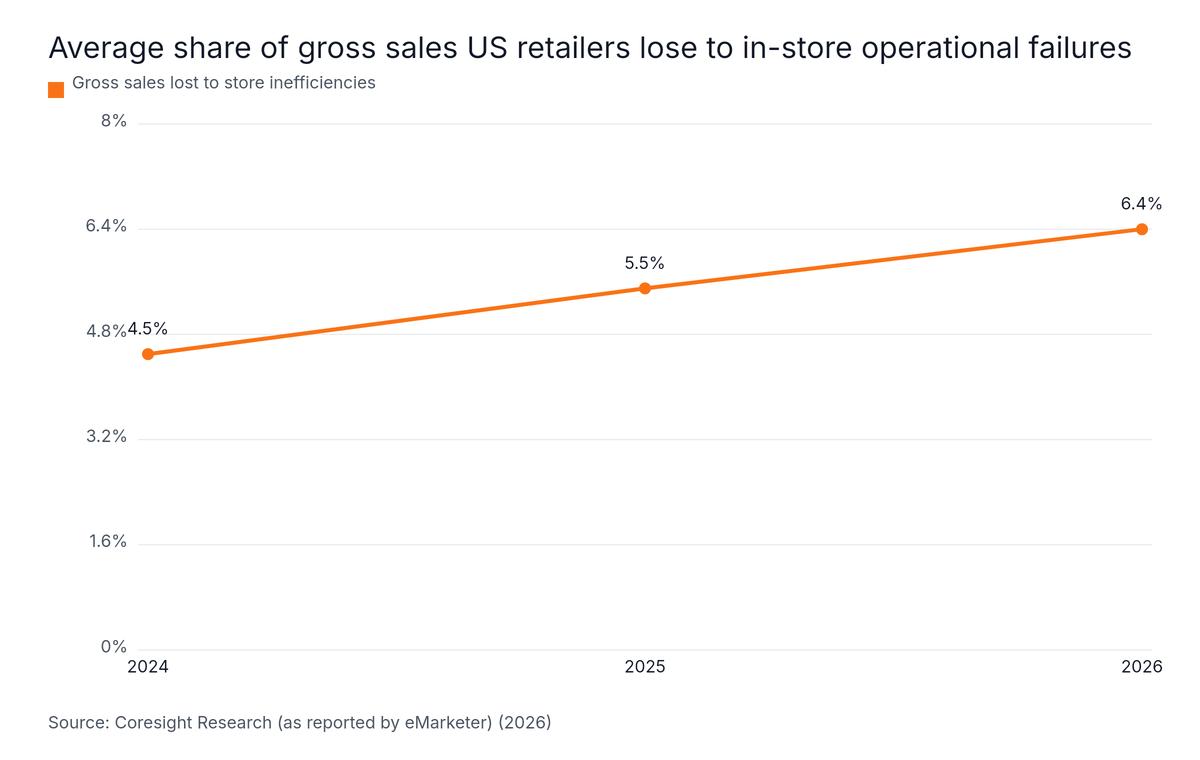
That 6.4% is up from 5.5% in 2025 and 4.5% in 2024, and eMarketer's report carries the line: "Store inefficiencies are getting worse, not better, meaning retailers must be more careful than ever with deploying store intelligence technology" (eMarketer, 2026).
Line chart: Average share of gross sales US retailers lose to in-store operational failures. Highest: 2026 at 6.4%.
Simbe's SVP of Market, Caitlin Allen, said: "These data points tell a larger story: retailers are losing shopper confidence where it matters" (Robotics Tomorrow, 2025). Most of these figures come from vendor surveys, so read them as directional. The problem is widespread: 84% of retailers say they struggle to manage store operations (Coresight Research, 2025).
Set up the programme in five steps
Define purpose and scope. Decide whether the audit measures brand standards, safety or customer experience. ISO 19011's scope, criteria and risk approach is a sound base. The revised ISO 19011:2026, published on 27 May 2026, is guidance only and keeps the audit principles unchanged (MSI International, 2026). The standards catalogue says it applies to audits of varying scope and to organisations of any size and type (EN ISO 19011:2026 listing, 2026).
Convert standards into pass or fail items. "Display is tidy" is an opinion. A check such as price labels matching the system on all sampled items is observable.
Pilot in 2-3 outlets of different formats. This exposes items that do not fit a small site before you roll out.
Calibrate auditors. Have two auditors score the same site and reconcile differences.
Roll out in phases. Core module first, format modules second.
What does retail audit checklist software fix that Excel can't?
Retail audit checklist software fixes version drift by holding one master template under controlled versions, locking the scoring formula, allowing region-level overrides only where approved, and logging every change. Excel copies fork by region. DOSS's 2026 survey of 1,003 US operations professionals found 53% deal with spreadsheet errors every week (DOSS, 2026).
The same survey found only 41% of organisations have a formal quality-control process for spreadsheets used in high-stakes decisions (DOSS, 2026). Respondents lose an average of 3.6 hours a week fixing mistakes, and a single significant error costs an average of $4,315 (DOSS, 2026). Its authors put it plainly: "Spreadsheets weren't built for real-time collaboration, version control, or the complexity that comes with scale" (DOSS, 2026). This is general spreadsheet evidence, not retail audit data.
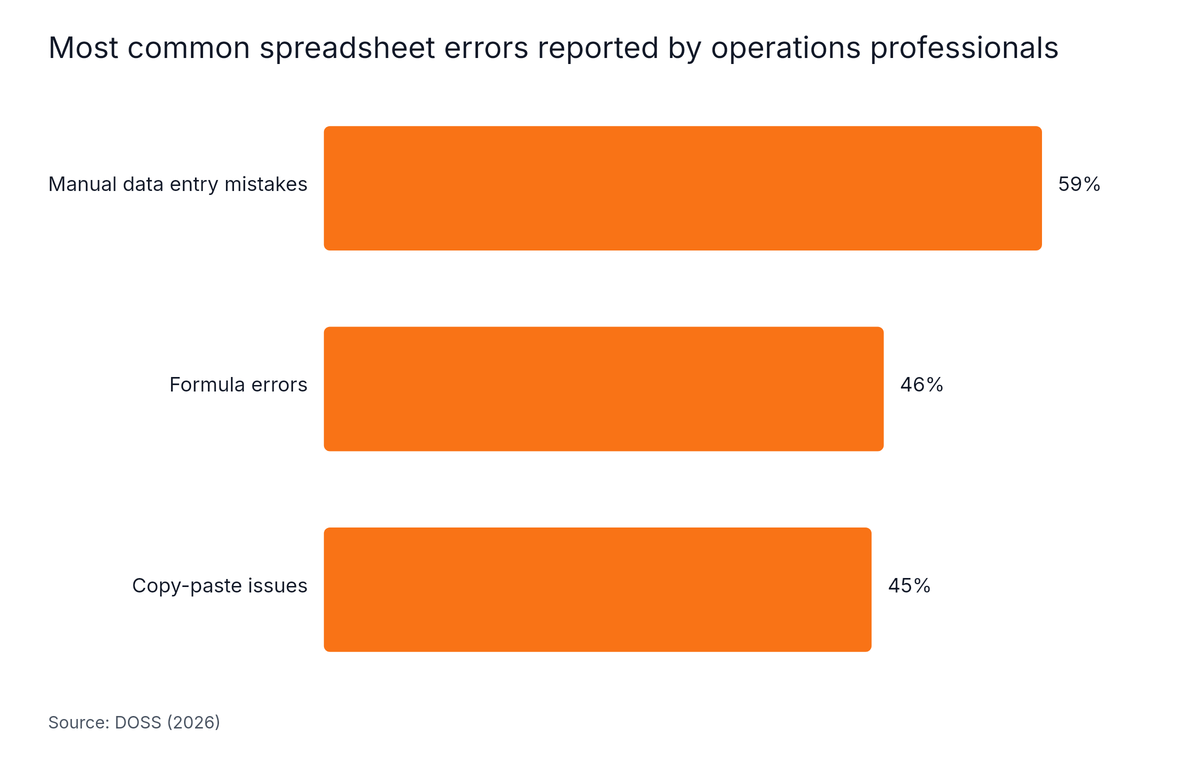
Horizontal Bar chart: Most common spreadsheet errors reported by operations professionals. Highest: Manual data entry mistakes at 59%.
Among the errors operations professionals report, manual data entry mistakes lead at 59%, followed by formula errors at 46% and copy-paste issues at 45% (DOSS, 2026). Formula errors matter most for audits, because a broken N/A formula changes every score downstream.
What changes in practice
Excel problem
What software changes
Regional copies of the checklist diverge
One master template with controlled versions
Someone edits the scoring formula
Formula locked and applied identically to every site
Regions want local items
Approved region-level overrides only
Nobody knows who changed what
Audit trail of edits and approvals
Standards updates do not reach every region
Updated checklist deployed to all sites at once
Standards drift is a communication problem too: 67% of head office leaders admit their communications to stores are at least sometimes ignored, duplicated or deprioritised (Zipline, 2026). Verdantix (2026), citing its 2025 global corporate survey, reports that 61% of firms are still developing a quality digitization strategy (Verdantix, 2026). It covers manufacturing quality rather than retail, so treat it as an adjacent-sector indicator.
Our data: AutoSmart reports audit cycle compression from 10 days to 3 days for its customers. This is the company's own reported outcome, not independent research, and the baseline is not defined here. Go-live typically takes 5 to 10 working days once the customer shares the required configuration inputs.
Format-adjusted scoring is not for networks where every outlet offers identical services, or for teams that cannot maintain a site-attribute register. Several figures here come from vendor surveys and adjacent sectors, so treat them as directional, and note that the worked example uses hypothetical numbers rather than measured results.
Know the limits before you adopt it:
Small networks with one format gain little. Plain percentage scoring works.
A stale register breaks fairness. If a site adds a bay and the profile is not updated, its score is wrong.
Heavy N/A shares hide risk. A site with a large share of items removed has been judged on a thin slice. Set a threshold and flag it.
Evidence is mixed. The retail data here is largely US and vendor-sourced, and regional checklist drift has no independent retail data yet.
We are rolling one checklist across outlets that do not all offer the same services: how do we handle that in a store audit checklist?
Tag each outlet with a format profile that switches modules and items on or off, then score each site as weighted points earned divided by weighted points applicable. Items the site does not offer drop out of both numbers. Require head office approval of the profile, a reason code for every N/A, and a visible N/A share per site.
Should not-applicable items count as a pass or be removed from the score?
Not-applicable items should be removed from the score, not counted as a pass. Counting N/A as a pass inflates the result for sites with fewer services, and counting it as a fail punishes them. Removing the item from both points earned and points possible means each outlet is judged only on the standards it can actually meet.
How do you calculate a regional audit score from different stores?
Calculate a regional audit score by pooling points: add all points earned across the sites, add all points possible, and divide. Averaging site percentages is only correct when every site has the same points possible, and N/A handling breaks that. Show section scores beside the total so format differences stay visible.
Who decides whether an audit item is not applicable?
Head office decides, through the outlet's approved format profile, not the auditor on the day. Tie N/A rules to a site-attribute register, such as bay count or services offered. Where an auditor must flag an exception, require a reason code and a photo, and have it reviewed before the score counts.
Conclusion
One retail audit checklist can score a 3-bay workshop and a flagship showroom fairly, as long as the rules are fixed before the first visit.
Score each site as weighted points earned divided by weighted points applicable.
Let approved format profiles, not auditors, decide what is N/A.
Cap and report the N/A share per site, and never allow N/A on critical items where the service exists.
Pool points for regional scores, and show section scores beside totals.
Replace drifting Excel copies with one controlled master template.
Start by listing your outlet formats and drafting the profile table above. Then see how it behaves in a live audit programme: Schedule a Free Demo. For the wider picture, read how paperless audit software changes day-to-day work.
Written by
Naseef Umar
Founder | CEO
Naseef Umar is an automotive industry expert and the Founder & CEO of AutoSmart, with over a decade of experience working across automotive operations, dealer standards, network performance, audits, and digital transformation.
Company
KERALA Full Address - Pulikillam W Rd, Kakkanad West, Chembumukku, Edappally, Kochi, Kerala 682030; DUBAI Full Address - Dubai Silicon Oasis, UAE

 Naseef UmarOct 20, 2026