
















The challenge
Five audits, five spreadsheets
Most teams run many kinds of audit across their outlets, and each one lives somewhere else.
Dealer Operating Standards
Checks each dealership against the brand’s rules for its building, staff, processes and customer care.
5S
Checks that workshops and stores are sorted, clean and organised, and that they stay that way.
Mystery shopping
A shopper visits as a normal customer and scores how the visit really went.
Health and safety
Checks fire exits, first aid, protective equipment and risks, so everyone at the outlet stays safe.
Internal audits
Your own checks on buildings, equipment and maintenance, outlet by outlet.
So no one sees the whole picture, scores can’t be compared, and the same problems come back at the next audit.
How it works
One loop for every audit
Whatever you audit, it runs the same way in AutoSmart, and each round makes the next one better.
1
Plan
Pick the audit, the outlets and the dates. Your checklists are already set up, with your own sections and scoring.
2
Audit
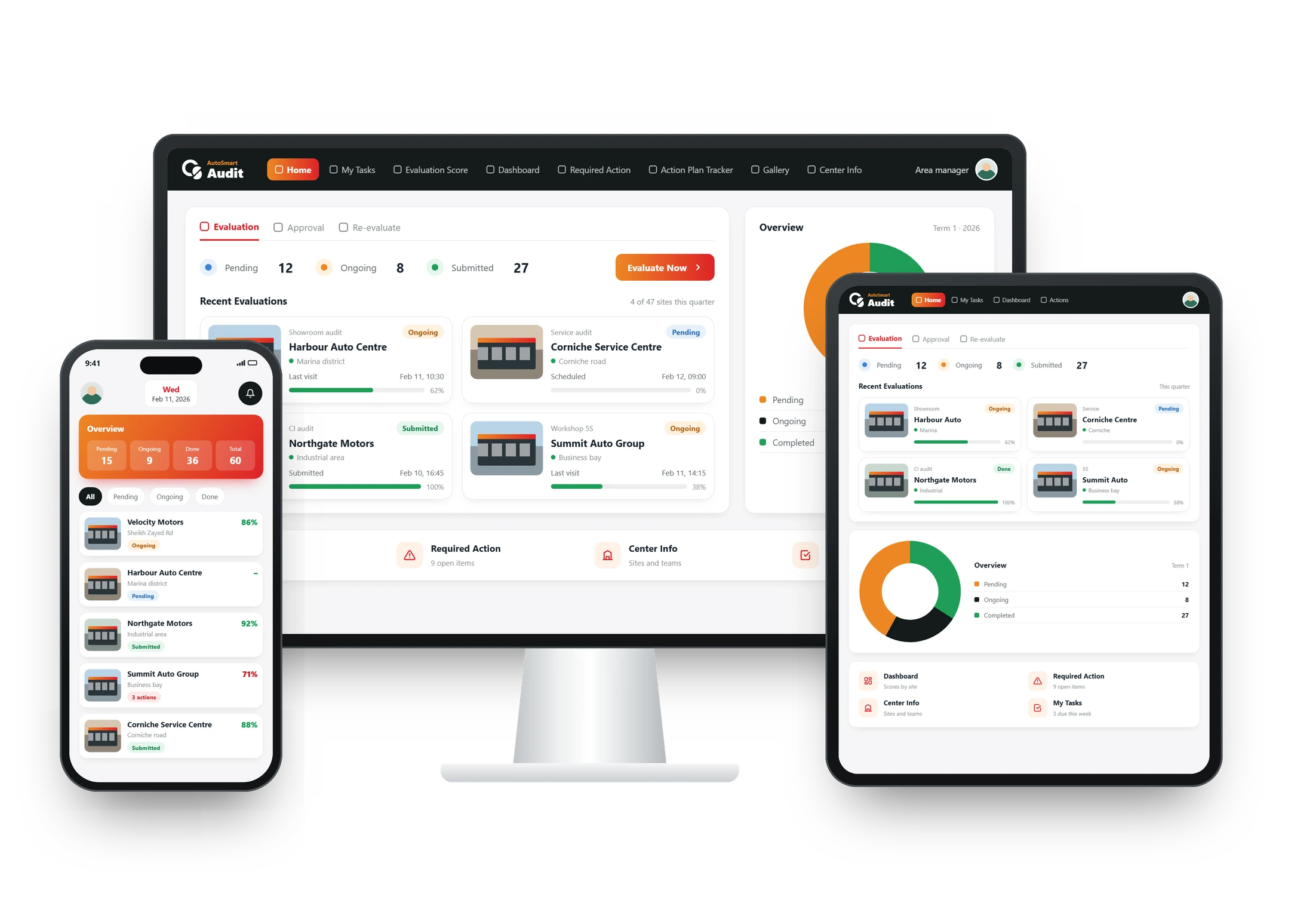
Auditors answer each item on a phone or tablet, take photos where the checklist asks, and the score adds up as they go.
3
Act
Every gap becomes an action with a person in charge and a due date, closed with photo proof.
4
Review
Every audit type on one dashboard, by outlet and region, so you know where to look in the next round.
Results
Results from AutoSmart customers
Before and after
Before and after, audit by audit
| Audit | Before | With AutoSmart |
|---|---|---|
| Dealer Operating Standards | An Excel file for every dealer | One scored checklist for every dealer |
| 5S | Paper sheets, typed up later | A photo on every item |
| Mystery shopping | Reports sent by email | Scored visits on the dashboard |
| Health and safety | A binder on a shelf | Every risk has a person in charge |
| Internal audits | A separate tool | The same application as everything else |
What gets audited
What teams audit with AutoSmart
Any audit that follows a standard can run in AutoSmart. These are the most common.
Dealer Operating Standards
- Facility and showroom standards
- Staffing and training records
- Processes and KPIs
5S
- Sort and set in order
- Shine and standardise
- Sustain, with photos
Customer experience and mystery shopping
- Service standards
- Mystery shopper visits
- Complaint handling
Need mystery shoppers? Find a partner on AutoSmart Audit Connect →
Brand standards and CI
- Signage and fascia
- Showroom and lounge design
- Branded materials
Health, safety and compliance
- Fire safety and exits
- PPE and first aid
- Regulator checklists, such as SASO or ESMA
Internal audits and your own templates
- Buildings and equipment
- Maintenance logs
- Any standard you already use
Who it’s for
Built for the teams that run audits
Network development
One view of every outlet’s results, so standards and priorities are set from data, not reports.
Quality and compliance
Every audit type on one platform, with scores that can be compared across outlets and auditors.
Audit agencies
Run each client’s checklist in one application and hand over scored, photo-backed results on the day.
FAQ
Audit management software: common questions
Can we run several audit programmes for the same outlets at once?
Yes. Dealer Operating Standards, 5S, customer experience, brand and CI, health and safety, and regulator checklists such as SASO or ESMA can run side by side, each with its own checklist, scoring and schedule. Results from every programme sit on one dashboard, where you can filter by audit type, outlet, brand or region, so head office sees the whole picture in one place.
How does audit management software calculate the score?
The score adds up as the auditor answers, using the weights you give each section and question. A fire exit item can count for more than a brochure display, for example. The total is calculated automatically as a score and a grade, so outlets, auditors and audit rounds can be compared on the same scale.
What happens if the auditor loses signal or is interrupted mid-audit?
Nothing is lost. Audits in progress save automatically, so an auditor can pause and pick up later, and in offline mode the mobile application keeps working without a connection, then uploads everything once the signal returns. That matters in basements, workshops and remote outlets, where a dropped connection would otherwise mean starting again.
Can we see how a checklist will look on the auditor’s phone before it goes live?
Yes. The audit builder has a live preview that shows each question exactly as the auditor will see it, so wording, photo rules and scoring can be checked before the first audit. Users with the right permissions can build and manage their own checklists, and every template, including those in the free library, can be changed: add, remove or edit questions, scoring and categories.
How much does audit management software cost?
AutoSmart Audit is priced per outlet, not per user, so auditors, managers and outlet teams are unlimited at no extra cost. Everyone gets unlimited checklists, the mobile application, photo evidence, automatic action plans and guided set-up. Tell us how many outlets you audit and we send one quote, with a free pilot first.
How long does it take to move our audits off spreadsheets and paper?
AutoSmart Audit can be set up and launched in 3 to 5 business days; larger roll-outs with training and custom approval steps take 2 to 4 weeks. Our solution specialists turn the checklists you use today into templates with your sections and scoring, import your data and train your users. Before you start, you can ask for a trial instance with sample data to explore the dashboards and reports.
Can we run AutoSmart Audit on our own servers?
Yes. AutoSmart Audit runs in the cloud or on your own servers, depending on your IT and compliance requirements. It is our own software, built by our team, not a third-party framework such as Oracle. Data residency options let you choose where your data is hosted, and single sign-on lets users log in through your company’s identity provider using SAML or OAuth.