











Overview
What are roles and permissions in AutoSmart?
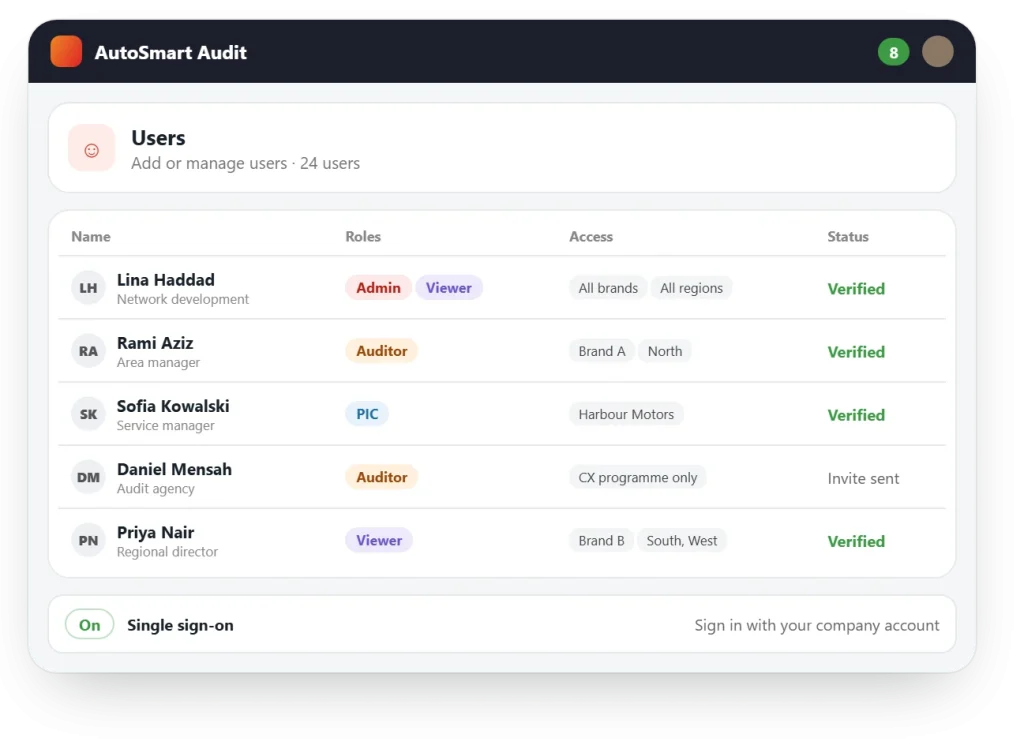
Roles and permissions decide what each user can see, edit and approve. In AutoSmart you set up your brands, regions and outlets once, give users a ready-made or custom role, limit their view by brand, location or audit programme, and let them sign in with single sign-on.
At a glance
Included in Standard roles on every plan; custom roles and single sign-on from Enterprise
Users Unlimited, on every plan
Hosting Cloud or your own servers
Results
Results from AutoSmart customers
Key capabilities
The right view for every user
One platform for the whole organisation, with each team seeing only what is theirs.
Your network, mapped once
Create and manage your dealers, locations and outlets in one place, and run several brands, countries or distributor groups under one parent account with separate data.
- Dealer and centre management
- Multi-brand, multi-region hierarchy (Enterprise)
Roles that fit your teams
Start with ready-made roles (ASM, ZSM, DDH, aftersales director and auditor), or define your own and control what each can see, edit and approve.
- Standard roles on every plan
- Custom roles and detailed permissions (Enterprise)
Access by brand, region or programme
Limit each user to the brands, branches, departments or audit programmes they are responsible for, and give outside audit agencies limited access.
- Visibility by location or department
- External agency auditor access (Enterprise)
Secure sign-in and hosting
Users sign in through your corporate identity provider, and the platform runs in the cloud or on your own servers, with a choice of where data is hosted.
- Single sign-on via SAML or OAuth (Enterprise)
- Data residency options (Enterprise)
What’s included
Everything in network, roles and security
Network
- Dealer and centre management
- Multi-brand, multi-region hierarchy
- Unlimited users on every plan
Access
- Standard roles
- Custom roles and detailed permissions
- Limited access for audit agencies
Security
- Single sign-on (log in with your company account)
- Cloud or your own servers
- Data residency options
Where it’s used
Where teams manage large networks
FAQ
Roles and permissions: common questions
Do we pay extra for every user we add?
No. Pricing is per outlet, not per user, and unlimited users are included. Auditors, persons in charge, zone managers and dealer teams can all have their own login at no extra cost, so nobody has to share an account to keep the bill down. Each user still sees only what their role allows.
Can a zone manager see only the outlets in their zone?
Yes. Visibility can be limited by location or department, so a zone manager, area sales manager or outlet owner sees only the outlets they are responsible for. You can also limit a user to the brands or audit programmes they look after. Ready-made roles cover ASM, ZSM, DDH, aftersales director and auditor.
Can an outside audit agency carry out audits for us?
Yes. You can invite third-party audit agencies with controlled, limited access, so their auditors work on your checklists and their findings land directly in the platform instead of arriving as a separate report. Like any other user, they can be limited to the brands, branches or audit programmes you choose, and every failed item they record becomes a tracked action.
Can we control who edits checklists and who approves actions?
Yes. Custom roles and detailed permissions let you decide exactly what each user can see, edit and approve. For example, only users with permission can build their own checklists, and closing an action can require a manager or head office to sign it off. An action can be created by one user, done by another and approved by a third.
Where is our audit data hosted?
AutoSmart Audit runs in the cloud, and it can also run on your own servers if your IT or compliance rules require it. Data residency options let you choose where your data is hosted to meet regional compliance requirements. Tell us your requirements on the demo call and we will show you the set-up that fits.
Is AutoSmart Audit built on Oracle or another third-party platform?
No. AutoSmart Audit is our own software, built by our team and run in the cloud, and it uses industry-standard, secure database technologies for reliability, performance and scalability. Because we own the code, we can adjust the platform to the way your network works, as we did for MG Motors MEA and Almajdouie Motors.
Can we manage our own list of dealers and outlets?
Yes. Dealer and centre management lets you create and manage your dealer network, locations and outlets in one place, and guided set-up helps you load your network, users and first audits. Several brands, countries or distributor groups can also run under one parent account with their data kept separate.