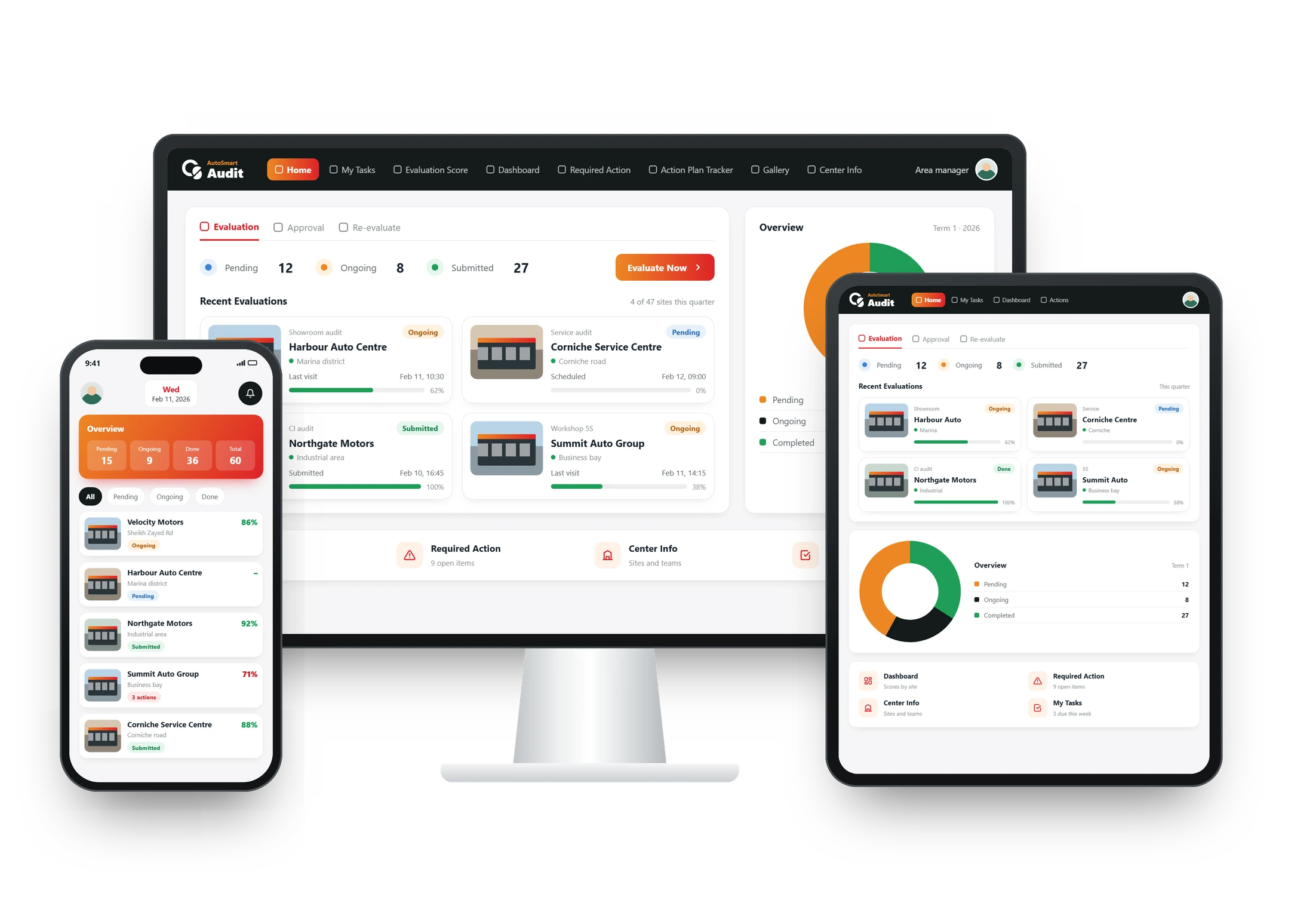













Overview
What are AI-powered evaluations?
AI-powered evaluations use AI to take routine work out of each audit. In AutoSmart auditors can capture findings by voice, AI checks that each photo matches its finding and flags poor evidence, suggests corrective actions, and answers your team’s setup questions through Ask AI.
At a glance
Included in The AI plan (everything in Enterprise, plus AI)
Where The AutoSmart application and dashboard
Covers Voice, photos, actions and setup help
Results
Results from AutoSmart customers
Key capabilities
AI where the audit work is
Four AI capabilities, each aimed at a step that slows audits down.
Voice AI
Capture audit answers and observations by speaking, with no typing on the shop floor.
- Speak findings during the walk-round
- Hands free for photos and checks
AI photo checks
AI reviews each evidence photo to confirm the finding matches the image, and flags blurry, duplicate or reused photos.
- AI photo evidence validation
- Evidence quality check
Suggested corrective actions
Get recommended fixes and root causes for each finding, drafted automatically for the person in charge.
- A draft fix for every finding
- Root causes suggested
Ask AI
Ask how to set up a checklist, scoring, users, roles or a workflow, and get the steps straight away.
- Setup questions
- Step-by-step answers
What’s included
Everything in AI-powered evaluations
During the audit
- Voice AI
- AI photo evidence validation
- Evidence quality check
After the audit
- AI-suggested corrective actions
- Ask AI
- Everything in the Enterprise plan
Where it’s used
Where teams use AI in their audits
FAQ
AI-powered evaluations: common questions
Can AI help us set up the platform?
Yes. Ask AI answers your admins’ setup questions, such as how to build a checklist, set up scoring, add users and roles or arrange a workflow, and gives the steps straight away. Questions about audit results are answered by the dashboard, which shows scores, trends and open actions as each audit is submitted.
Can Voice AI fill in the finding, action and due date from what the auditor says?
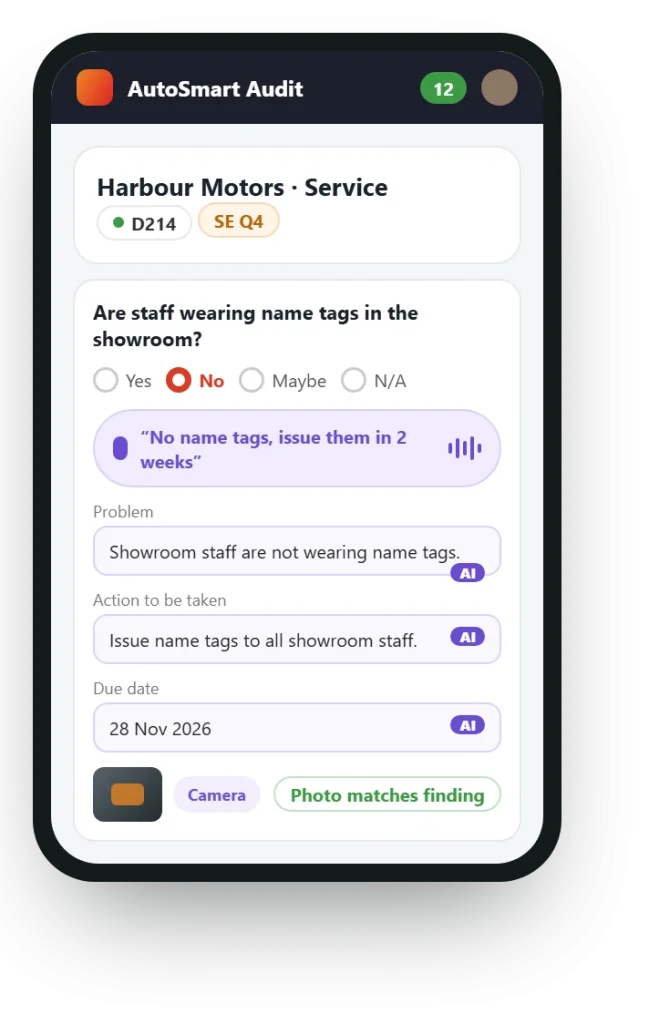
Yes. The auditor speaks instead of typing, and Voice AI captures the answer and observation. For example, an auditor who says “No name tags, issue them in 2 weeks” gets the problem, the action and the due date filled in. That keeps the auditor’s hands free for photos and checks during the walk-round on the shop floor.
Does AI replace our auditors?
No. The AI takes routine work out of each audit, but your auditors still visit the outlet and make the findings. Voice AI saves typing, AI photo checks review the evidence they capture, and suggested corrective actions are drafts, with root causes, for the person in charge to act on. The result is less busywork in every audit.
How are AI photo checks different from camera-only photos?
Camera-only capture and location stamps control how a photo is taken; AI photo checks look at what the photo shows. You can block gallery uploads and stamp each submission with its location and time, and AI then also confirms that the image matches the finding and automatically flags blurry, duplicate or reused photos.
How do AI-suggested corrective actions work?
AI drafts a recommended fix and suggested root causes for each finding automatically, for the person in charge to review. The person in charge decides what to do, updates the action with notes and photos as the fix progresses, and the action closes only when it is approved, so the AI speeds up the action plan without taking the decision away from your team.
How is our data protected when we use the AI features?
Your audit data stays under the same controls as the rest of the platform. Custom roles and permissions decide what each user can see, single sign-on lets users sign in through your corporate identity provider, and data residency options let you choose where data is hosted. Tell us your compliance requirements on the demo call.